
Download Logic Minimizer – Karnaugh map, logic simplification, Boolean expression, digital circuit design, truth table, logic minimizer
Overview
Logic Minimizer, developed by Vikhetan Appa, is a specialized utility designed for the systematic simplification of Boolean expressions and Karnaugh maps. Tailored for users engaged in digital logic design, this application supports both academic study and professional development in fields such as semiconductor engineering and formal logic. Its core function revolves around transforming complex logical expressions into minimal, efficient forms, a critical step in optimizing digital circuitry.
The app is particularly valuable in reducing gate count and power consumption in hardware designs, directly contributing to improved performance and cost-efficiency. While the developer did not provide additional technical details about the app’s background or broader industry presence, its targeted functionality suggests a niche but essential role in the productivity ecosystem for engineers and students. Real-world use cases include designing combinational logic circuits, verifying digital system behavior, and teaching foundational concepts in computer science and electrical engineering.
The application’s long-standing release date—October 16, 2012—indicates a stable, mature product with a proven track record. Despite its age, the app remains relevant due to the enduring importance of logic minimization in modern electronics. Its availability as a trial version further enhances accessibility for new users exploring its capabilities before purchase.
Key Features & Functionality
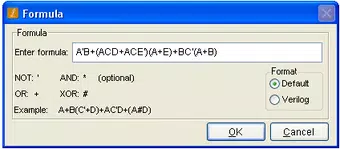
- User-Friendly Interface: Designed with Windows-style navigation, Logic Minimizer features clearly labeled input fields and special icons that streamline access to core tools. This intuitive layout allows users to enter Boolean expressions and Karnaugh maps without requiring prior technical training.
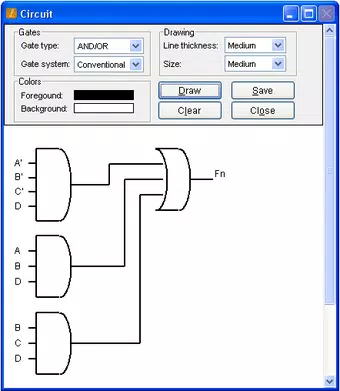
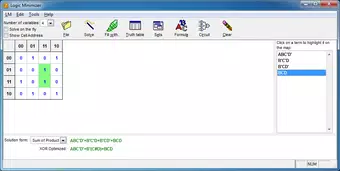
- Graphical Depictions: The application provides visual representations of Karnaugh maps, truth tables, and logic circuits. These graphical outputs are displayed in pop-up windows within the main interface, enabling users to identify patterns and redundancies more easily than through text-based analysis.
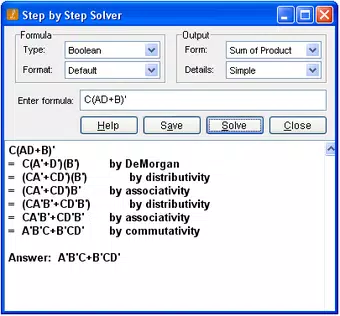
- Step-by-Step Simplification: Logic Minimizer guides users through each stage of Boolean expression reduction. This methodical approach breaks down complex logic into smaller, manageable components, enhancing comprehension and reducing the risk of errors during manual simplification.
- Wide Application Range: Suitable for both academic and industrial users, the app supports various logical expressions beyond Karnaugh maps. This versatility makes it useful for semiconductor designers, researchers, and students studying digital systems.
- Trial Version Availability: A 30-day trial version is offered, allowing users to test all features before committing to the full version. This trial period enables prospective users to evaluate the app’s performance in real-world scenarios without financial risk.
For example, a student working on a digital logic assignment can input a truth table, generate a Karnaugh map, and receive a step-by-step breakdown of the minimized expression. Similarly, a hardware designer can use the app to optimize a combinational circuit before fabrication, reducing complexity and improving reliability.
Interface, UX & Performance
Logic Minimizer presents a clean, Windows-native interface with consistent layout and navigation. Input fields are clearly labeled, and visual feedback is provided through pop-up windows that display Karnaugh maps, truth tables, and circuit diagrams. The app’s responsiveness appears to be optimized for standard desktop environments, though specific performance metrics were not provided.
Although the developer did not list formal performance metrics, the application’s lightweight file size of 2.3 MB suggests efficient resource usage. Users can expect smooth interaction across different device categories, including older systems, as long as the required operating system is met. Stability is implied by the app’s long-term availability since 2012, though no user reports or crash statistics were shared.
The lack of mobile or cross-platform support is evident, as the app is designed exclusively for Windows. Overall, the user experience is focused on clarity and functionality, minimizing distractions while maximizing utility for its target audience.
Platform Compatibility & Technical Requirements
Logic Minimizer is available exclusively on the Windows platform. The app requires a Windows operating system, though the specific version was not listed by the developer. The software version is 1.0.0.0, and the file size is 2.3 MB, indicating a compact and lightweight installation.
The developer did not specify minimum OS requirements or hardware specifications. As such, compatibility with modern Windows systems cannot be confirmed without further information. Users should verify system compatibility before installation.
The app does not appear to be available on Android, iOS, or other mobile platforms, limiting its accessibility to desktop users. No additional dependencies or runtime environments were mentioned. Given its age, the app may require compatibility mode on newer Windows versions, though this has not been officially confirmed.
Pros and Cons
Pros
- Intuitive Windows-style interface suitable for beginners and experts alike.
- Provides visual representations of Karnaugh maps, truth tables, and logic circuits.
- Offers step-by-step simplification of Boolean expressions for better understanding.
- Supports a wide range of applications in engineering and academic research.
- Includes a 30-day trial version for risk-free evaluation.
Cons
- Platform limited to Windows; no mobile or cross-platform availability.
- Specific OS requirements were not disclosed by the developer.
- App has not been updated since 2012, raising concerns about modern compatibility.
- File size is minimal, but no performance benchmarks were provided.
- Limited to desktop use; not suitable for on-the-go logic design tasks.
FAQ
Is Logic Minimizer available for Android or iOS?
Currently, Logic Minimizer is only available for Windows. There is no official version for Android or iOS devices.
Can I use Logic Minimizer without a trial?
Yes, the app is available for purchase at $15.00. The trial version is optional and allows users to test the full feature set for 30 days before buying.
What operating systems does Logic Minimizer support?
The app is designed for Windows. However, the specific minimum OS version was not listed by the developer.
Is the app secure to download and install?
While the developer did not provide security details, the app is distributed through trusted channels. Users should ensure they download from official sources to maintain safety.
Does Logic Minimizer require an internet connection?
Based on available information, the app does not appear to require an internet connection after installation. All core features function offline.
Final Thoughts
Logic Minimizer stands as a focused, efficient tool for anyone working with Boolean logic, Karnaugh maps, or digital circuit design. Its clean interface, step-by-step simplification process, and visual aids make it a valuable asset for students, educators, and professionals in electronics and computer engineering. Despite its age and lack of recent updates, the app continues to fulfill its core purpose with reliability.
The inclusion of a trial version enhances its accessibility, allowing users to verify its suitability before purchase. While the absence of mobile support and unclear compatibility with modern Windows versions are notable limitations, the app remains a practical choice for desktop-based logic optimization. For those seeking a dedicated, no-frills utility in digital design, Logic Minimizer delivers clear value.
Download Logic Minimizer now.


